

If you’ve ever been in the middle of a productive session only to be hit by Claude usage limits, you are not alone. Whether you are on the free tier or the $20/month Pro plan, the frustration of being throttled is a common experience among users. However, there are new tools and strategies available to help you navigate these limits and get the most value out of your subscription.
Choosing the Right Plan: Pro vs. Max vs. API

Claude Usage Limits
Recent forensic analysis of Claude’s code suggests that for individual users, the subscription plans offer a much better deal than using the API. While the Pro plan is a standard choice, Anthropic is increasingly nudging heavy users toward the $100/month Max plan, which provides the best overall value for those who require high volume.
A significant change to note is that Claude Code is now included in these plans, meaning you no longer need to rely solely on the API to access that functionality. While these terms are subject to Anthropic’s whims, as of now, staying within the individual plans is the most cost-effective path for most people.
The “Claude Code Counter” Extension
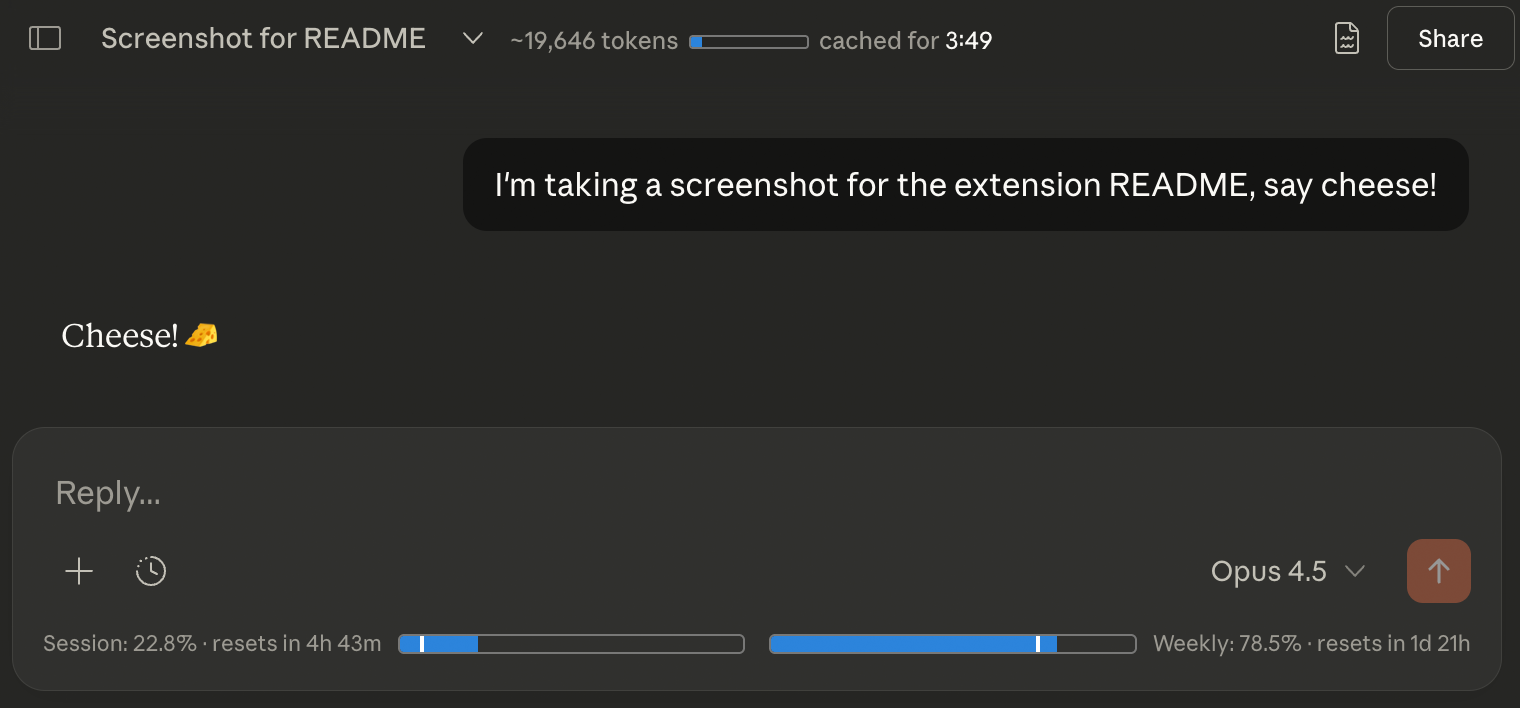
One of the most helpful developments for managing your workflow is a new Chromium extension designed to track your usage in real-time.
- Real-time Tracking: The extension displays your session and weekly limits directly inside each chat window.
- Convenience: You no longer have to flip back to your settings menu to check how much usage you have left.
- Compatibility: It works on Chrome, Edge, and other Chromium-based browsers, as well as Firefox via User Script.
How to Install It:
- Download the zip file for the extension.
- Open your browser’s extensions tab (e.g.,
edge://extensionsorchrome://extensions). - Drag the zip folder directly into the window (no unzipping required).
- Refresh your Claude chat window to see the counter populate at the bottom of the screen.
Pro Tips for Staying Under the Limit
Beyond using a tracker, Anthropic recommends several best practices to ensure you aren’t wasting your message quota:
- Use Projects Effectively: Instead of starting multiple separate chats on the same topic, organize your work into a Project. Upload your core documents, information, and system prompts into the project knowledge base.
- Stay Organized: Having individual chats inside a project helps the AI maintain context without you needing to re-upload data, which saves on processing and limits.
- Check Official Documentation: Anthropic regularly updates its “usage limit best practices,” and it is worth reviewing them if you find yourself being throttled frequently.
The Bottom Line
While AI tools are likely to become more expensive as we use them more frequently, the value provided often far outweighs the cost. By using tools like the Code Counter extension and mastering Project-based workflows, you can minimize interruptions and keep your productivity high Claude AI Usage.

