

Missing Session Timeout —
Complete Bug Bounty Guide 2026
Missing Session Timeout extends the attack window of every session vulnerability — a stolen token valid for 7 days is catastrophic compared to one expiring in 15 minutes. This guide covers idle timeout, absolute timeout, JWT expiry testing, and all framework fixes.
- What is Missing Session Timeout?
- Idle Timeout vs Absolute Timeout
- Severity Scales With Lifetime
- Quick Reference Table
- Manual Testing — Step by Step
- JWT Expiry Deep Dive
- Tools & Automation
- Burp Suite Guide
- Recommended Timeouts by App Type
- Framework Fix Reference
- Real Bug Chains
- Defense & Secure Coding
- Key Takeaways
🔍 What is Missing Session Timeout?
Missing Session Timeout occurs when an application fails to automatically terminate a user’s session after inactivity or after a maximum absolute duration. A session that never expires — or one that lasts days — dramatically extends the window attackers have to exploit any stolen, captured, or abandoned session token.
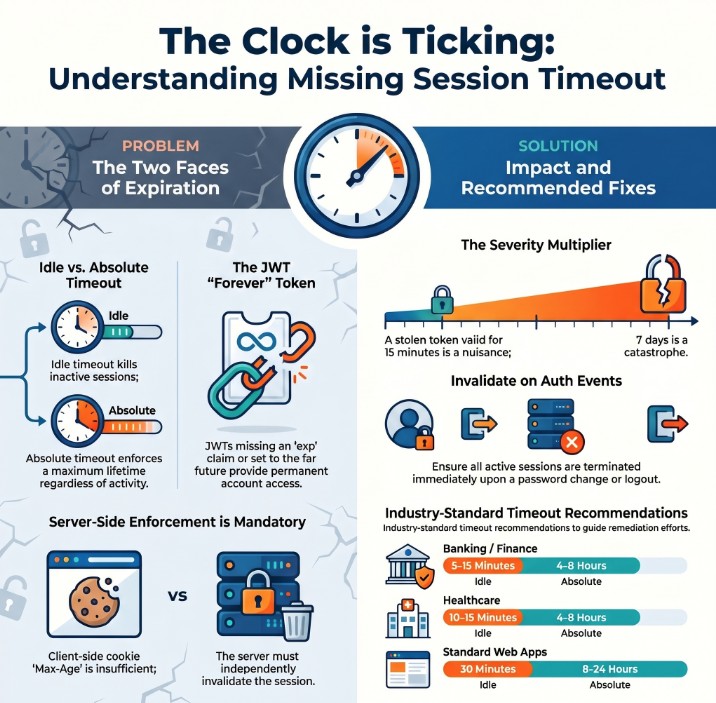
Missing Session Timeout — stolen session token remains valid long after victim expects it to be dead
Missing Session Timeout is a force-multiplier. It does not create a session attack on its own — it makes every other session attack (XSS theft, network sniffing, shared device access) far more dangerous by extending the attack window from minutes to hours, days, or even permanently. A 15-minute token stolen via XSS causes limited damage. The same token valid for 30 days is a catastrophe.
⚡ Two Types of Session Timeout — Both Must Be Configured
An app can have idle timeout but no absolute timeout — a user who keeps clicking around can stay logged in forever. And an app can have absolute timeout but no idle timeout — stepping away from a terminal for 4 hours leaves a wide-open window. Test both separately.
📊 Severity Scales Directly With Token Lifetime
📊 Missing Session Timeout — Quick Reference
| Field | Details |
|---|---|
| Vulnerability | Missing Session Timeout |
| Also Known As | Insufficient Session Expiration, No Idle Timeout, Long-lived Session, CWE-613 |
| OWASP | A07:2021 — Identification and Authentication Failures |
| CWE | CWE-613: Insufficient Session Expiration |
| CVE Score | 4.3 – 7.5 (scales with lifetime duration) |
| Severity | Low → High → Critical (JWT with no exp = Critical) |
| Root Cause | No server-side session expiry; JWT with far-future or missing exp; default framework values |
| Where to Check | Cookie Max-Age/Expires | JWT exp claim | Session after 30+ min idle | Session after 8+ hours |
| Best Tools | Burp Suite Repeater, curl, Python requests, jwt_tool, browser DevTools |
| Practice Labs | PortSwigger Authentication Labs, HackTheBox, TryHackMe, OWASP WebGoat |
| Difficulty | Beginner — requires only waiting and replaying; no technical exploit skill needed |
| Force Multiplier | Makes every other session vulnerability more severe — always report in combination |
| Related Vulns | Session Hijacking, Insecure Logout, Session Fixation |
🧠 Manual Testing for Missing Session Timeout
Always test two things separately: (1) idle timeout — does session expire after inactivity? (2) absolute timeout — does session expire after a maximum duration even with continuous activity? Both can be missing independently.
Phase 1 — Idle Timeout Test
-c cookies.txt to save. Record the exact time of login.GET /api/me with the saved token. Confirm 200 OK and user data returned. This is your baseline proof that the session was valid.# Step 1: Login and save session curl -c cookies.txt -X POST https://target.com/api/login \ -H 'Content-Type: application/json' \ -d '{"email":"test@test.com","password":"test123"}' # Step 2: Confirm baseline works curl -b cookies.txt https://target.com/api/me # → {"user_id":1001,"email":"test@test.com"} # Step 3: Wait 30 minutes (genuinely idle) sleep 1800 # Step 4: Replay old session curl -b cookies.txt https://target.com/api/me # SECURE: HTTP 401 Unauthorized # VULNERABLE: HTTP 200 + user data → idle timeout MISSING
Phase 2 — Absolute Timeout Test
# Keep session alive with periodic pings, test for absolute expiry
START=$(date +%s)
while true; do
  CODE=$(curl -b cookies.txt -s -o /dev/null -w '%{http_code}' \
         https://target.com/api/me)
  ELAPSED=$(( ($(date +%s) - $START) / 60 ))
  echo "t+${ELAPSED}min: HTTP $CODE"
  [ "$CODE" = '401' ] && echo "Session expired at t+${ELAPSED}min" && break
  sleep 300  # ping every 5 min to keep alive
done

# Expected results:
# t+480min (8h): 401 → Good absolute timeout
# t+1440min (24h): 200 OK → Missing absolute timeout!
Phase 3 — Password Change Session Invalidation
# Session 1: Login from Device A
curl -c session1.txt -X POST https://target.com/api/login \
     -d '{"email":"test@test.com","password":"test123"}'

# Session 2: Login from Device B (different session)
curl -c session2.txt -X POST https://target.com/api/login \
     -d '{"email":"test@test.com","password":"test123"}'

# Change password using Session 1
curl -b session1.txt -X POST https://target.com/api/password/change \
     -d '{"old":"test123","new":"NewPass456!"}'

# Test Session 2 (other device) after password change
curl -b session2.txt https://target.com/api/me
# SECURE:     401 → All other sessions invalidated on password change
# VULNERABLE: 200 → Session 2 still valid despite password change!
🔐 JWT Expiry Testing — Deep Dive
JWT tokens with no exp claim or with exp set to year 2099 are a Critical finding. The token can never be revoked and remains valid indefinitely. This is the #1 JWT-related session vulnerability found in bug bounty programs.
# Decode JWT payload (middle section between dots)
echo 'eyJ1c2VyX2lkIjoxMDAxfQ==' | base64 -d
# Or: python3 jwt_tool.py YOUR_TOKEN

# SECURE — short expiry:
{"user_id": 1001, "exp": 1704067815}  ← 15 min from now

# VULNERABLE — far-future expiry:
{"user_id": 1001, "exp": 4102444800}  ← Year 2099!

# CRITICAL — no exp at all:
{"user_id": 1001}  ← No exp → permanent token

# Convert exp timestamp to human date:
python3 -c "import datetime; print(datetime.datetime.fromtimestamp(4102444800))"
# → 2099-12-31 00:00:00
# Even if exp is set, the server must validate it!
# Some servers issue tokens with correct exp but never check it.

# Step 1: Get a JWT with short exp (e.g. 15-minute token)
# Step 2: Wait for it to expire (wait 20 minutes)
# Step 3: Replay the expired JWT
curl -H "Authorization: Bearer EXPIRED_JWT_TOKEN" \
     https://target.com/api/me

# SECURE:     HTTP 401 {"error": "Token expired"}
# VULNERABLE: HTTP 200 + user data → exp claim NOT validated!
🤖 Tools for Missing Session Timeout Testing
HTTP History → right-click → Send to Repeater → wait → Send
curl -c cookies.txt /login ; sleep 1800 ; curl -b cookies.txt /api/me
time.sleep(interval); requests.get(url, cookies=session)
python3 jwt_tool.py TOKEN → shows exp as readable date
F12 → Application → Cookies → Expires column
epochconverter.com → paste exp value → read date
🔥 Burp Suite — Missing Session Timeout Guide
GET /api/me → Ctrl+R (Repeater) → Send (confirm 200 baseline) → wait 30 min → Send again. 200 OK = idle timeout missing.Max-Age or Expires attribute. Missing both = no client-side hint, but also test server-side.📋 Recommended Timeout Values by Application Type
| Application Type | Idle Timeout | Absolute Timeout | Risk if Missing |
|---|---|---|---|
| Banking / Finance | 5–15 min | 4–8 hours | Critical — direct financial loss |
| Healthcare / Medical | 10–15 min | 4–8 hours | Critical — HIPAA violation risk |
| E-Commerce / Payments | 15–30 min | 8 hours | High — payment data exposure |
| Admin / Staff Panels | 15 min | 4–8 hours | High — privileged operations |
| Standard Web App | 30 min | 8–24 hours | Medium — general user data |
| JWT Access Tokens | 5–15 min | N/A (use refresh) | Critical — use refresh token pattern |
| JWT Refresh Tokens | N/A | 24 hours max | High — rotate on every use |
🛠️ Framework Secure Configuration Reference
| Framework | Vulnerable Default | Secure Configuration |
|---|---|---|
| PHP | session.gc_maxlifetime = 1440 | session.gc_maxlifetime = 900; |
| Node/Express | cookie: {} // no maxAge | cookie: { maxAge: 15 * 60 * 1000 } |
| Django | SESSION_COOKIE_AGE = 1209600 | SESSION_COOKIE_AGE = 900 |
| Spring Boot | # no timeout configured | server.servlet.session.timeout=15m |
| Laravel | ‘lifetime’ => 120 | ‘lifetime’ => 15, ‘expire_on_close’ => true |
| JWT | exp: now + (86400 * 365) | exp: Math.floor(Date.now()/1000) + 900 |
| Redis sessions | SET session:ID value | SET session:ID value EX 900 |
🔗 Real Missing Session Timeout Bug Chains
🛡️ Defense Against Missing Session Timeout
Configure both idle timeout AND absolute timeout server-side. Set JWT exp to 15 minutes maximum for access tokens. Use refresh tokens for longer sessions. Invalidate ALL sessions on password change and logout.
// Node.js / Express — Both timeout types
app.use(session({
    secret: process.env.SESSION_SECRET,
    resave: false,
    saveUninitialized: false,
    cookie: {
        httpOnly: true,
        secure:   true,
        sameSite: 'strict',
        maxAge:   15 * 60 * 1000  // 15 min idle timeout
    },
    rolling: true,  // reset idle timer on every request
}));

// Absolute timeout middleware
app.use((req, res, next) => {
    if (req.session?.loginTime) {
        const elapsed = Date.now() - req.session.loginTime;
        if (elapsed > 8 * 60 * 60 * 1000) {  // 8 hour absolute
            req.session.destroy();
            return res.status(401).json({error: 'Session expired'});
        }
    }
    next();
});

// JWT — always set short exp
const token = jwt.sign(
    {user_id: user.id, role: user.role},
    process.env.JWT_SECRET,
    {expiresIn: '15m'}  // never omit expiresIn!
);
☑ Idle timeout configured server-side — 15-30 min for sensitive apps
☑ Absolute timeout enforced — 8-24 hours regardless of activity
☑ JWT access tokens: exp = 15 minutes maximum — use refresh tokens
☑ JWT refresh tokens: 24-hour expiry, deleted from DB on use
☑ All sessions invalidated on password change
☑ All sessions invalidated on logout — not just current device
☑ Cookie Max-Age set to match server-side timeout value
☑ Server validates JWT exp on every request — not just issuance
☑ Provide “logout all devices” feature for users
☑ Log session creation/expiry for audit trail
🔗 PortSwigger — Authentication and Session Labs
🔗 OWASP A07:2021 — Authentication Failures
🔗 OWASP Session Management Cheat Sheet
🔗 CWE-613: Insufficient Session Expiration
📖 Session Hijacking — Complete Bug Bounty Guide
📖 Insecure Logout — Complete Bug Bounty Guide
📖 Session Fixation Guide
📖 Authentication Bypass Guide
🧠 Key Takeaways — Missing Session Timeout
- Missing Session Timeout is a force-multiplier — it makes every session attack more severe by extending the window
- Test two things separately: idle timeout (inactivity) AND absolute timeout (max lifetime)
- Always decode every JWT and check the
expclaim — far-future or missing = Critical finding - Severity scales with token lifetime — hours = Low/Medium, days = High, never = Critical
- Client-side
Max-Agealone is NOT sufficient — server-side must also expire the session - Test at specific intervals: 15, 30, 60 min; then 2, 4, 8, 24 hours — document the exact lifetime
- Test session invalidation on password change — often missed separately from timeout testing
- JWT with no exp claim = one of the most common Critical findings in modern bug bounty programs
- Frame impact clearly: “token remains valid for X days” — numbers make severity undeniable
- Banking/healthcare: 5-15 minute idle timeout is the standard — anything beyond that is a reportable finding
A SaaS platform issued JWT tokens with exp set to year 2099. Any single token leak gave permanent account access. The fix was three characters in the JWT issuance code: expiresIn: '15m'. Bounty paid: $4,000. One field. Maximum severity. Always check the exp claim.

