
Simultaneous Login Allowed —
Concurrent Sessions Bug Bounty Guide 2026
Simultaneous Login allows attackers to authenticate alongside the legitimate user — undetected, no notification, no forced logout. Both sessions run in parallel and the victim has no signal that their account is being accessed by someone else.
🔍 What is Simultaneous Login (Concurrent Sessions)?
Simultaneous Login occurs when an application allows multiple active authenticated sessions for the same user account at the same time — without any notification, restriction, or forced logout. An attacker who obtains credentials can log in while the victim is still active, and both sessions run in parallel. The victim has absolutely no signal that a second session exists.
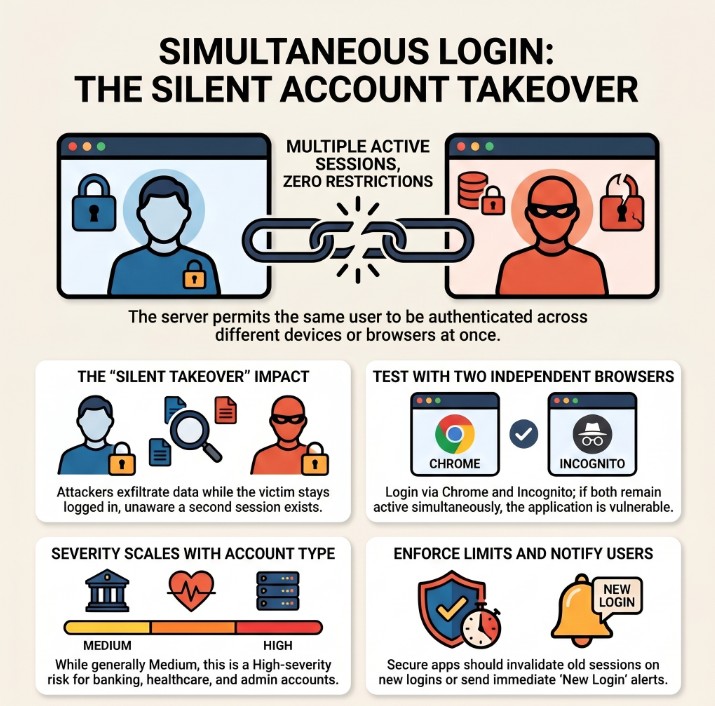
Simultaneous Login — attacker and victim both authenticated concurrently; victim receives no notification
Simultaneous Login is a silent account compromise. The attacker does not need to kick the victim out. They log in alongside them. Both sessions are valid, both return the same user’s data. The victim sees nothing unusual — no notification, no forced logout, no “someone else signed in” banner. The compromise is invisible until a server-side audit is performed.
⚡ 6 Scenarios Where Simultaneous Login Is Exploited
📊 Simultaneous Login — Quick Reference Table
| Field | Details |
|---|---|
| Vulnerability | Simultaneous Login Allowed (Concurrent Sessions) |
| Also Known As | Concurrent Session Control Missing, Multiple Active Sessions, No Session Limit |
| OWASP | A07:2021 — Identification and Authentication Failures | WSTG-SESS-04 |
| CVE Score | 3.5 – 6.5 (context-dependent) |
| Severity | Low → Medium (High for admin, banking, or healthcare — no notification) |
| Root Cause | No per-user session count limit; JWT issuance without revoking previous tokens; no notification hook |
| Where to Check | Login endpoint (two browsers); JWT multiple issuance; account settings for session management page |
| Best Tools | Two browsers (Chrome + Firefox or Incognito), Burp Suite Repeater, Python requests, curl |
| Practice Labs | PortSwigger Authentication Labs, HackTheBox, TryHackMe, OWASP WebGoat |
| Difficulty | Beginner — requires only two browsers and valid credentials; no exploit technique needed |
| Key Test | Two separate sessions both return 200 on /api/me with same user_id simultaneously |
| Related Vulns | Session Hijacking, Missing Session Timeout, Insecure Logout |
🧠 Manual Testing for Simultaneous Login
Open two different browsers. Log in with the same credentials in both. Confirm both sessions return 200 on an authenticated endpoint with the same user_id. No complex exploit needed — the vulnerability proves itself.
Phase 1 — Core Two-Session Test
GET /api/me with SESSION_A → note user_id. Call GET /api/me with SESSION_B → same user_id. Both 200 OK with same user = CONFIRMED.# Step 1: Login and save Session A curl -c session_a.txt -X POST https://target.com/api/login \ -H 'Content-Type: application/json' \ -d '{"email":"test@test.com","password":"test123"}' # Step 2: Login again and save Session B (same credentials) curl -c session_b.txt -X POST https://target.com/api/login \ -H 'Content-Type: application/json' \ -d '{"email":"test@test.com","password":"test123"}' # Step 3: Test both simultaneously echo "=== Session A ===" curl -b session_a.txt https://target.com/api/me echo "=== Session B ===" curl -b session_b.txt https://target.com/api/me # SECURE: Session A returns 401 after Session B login # VULNERABLE: Both return 200 with same user_id
Phase 2 — Mass Session Limit Test
# Create 5 sessions in a loop
for i in 1 2 3 4 5; do
  curl -c "session_${i}.txt" -s -o /dev/null \
       -X POST https://target.com/api/login \
       -H 'Content-Type: application/json' \
       -d '{"email":"test@test.com","password":"test123"}'
  echo "Created session $i"
done

# Test all 5 simultaneously
for i in 1 2 3 4 5; do
  code=$(curl -b "session_${i}.txt" -s -o /dev/null -w '%{http_code}' \
         https://target.com/api/me)
  echo "Session $i: HTTP $code"
done

# SECURE:  Only 1 session active (or limited to N)
# VULNERABLE: All 5 return 200 → no session limit
Phase 3 — JWT Concurrent Token Test
# Issue JWT_1
JWT_1=$(curl -s -X POST https://target.com/api/auth/login \
        -d '{"email":"test@test.com","password":"test123"}' \
        | python3 -c "import json,sys; print(json.load(sys.stdin)['access_token'])")

# Issue JWT_2 from same account
JWT_2=$(curl -s -X POST https://target.com/api/auth/login \
        -d '{"email":"test@test.com","password":"test123"}' \
        | python3 -c "import json,sys; print(json.load(sys.stdin)['access_token'])")

# Test JWT_1 (should be invalidated when JWT_2 was issued)
curl -H "Authorization: Bearer $JWT_1" https://target.com/api/me

# Test JWT_2
curl -H "Authorization: Bearer $JWT_2" https://target.com/api/me

# SECURE:     JWT_1 returns 401 after JWT_2 issued (token versioning)
# VULNERABLE: Both JWTs return 200 → no JWT concurrency control
🤖 Tools for Simultaneous Login Testing
Browser A: Chrome normal → Browser B: Firefox or Incognito
Ctrl+R → Tab 1: SESSION_A, Tab 2: SESSION_B → Send both
curl -c sess_a.txt /login ; curl -c sess_b.txt /login
requests.Session() × N → all login → all test /api/me
F12 → Application → Cookies → compare session values
Check inbox → no email = missing login notification finding
🔥 Burp Suite — Simultaneous Login Guide
Cookie: session=SESSION_A in any authenticated request.Cookie: session=SESSION_B. Verify SESSION_B ≠ SESSION_A.💣 Advanced Techniques
Admin Concurrent Session — Highest Impact
# If admin credentials are obtained (via phishing, breach, etc.)
# Test concurrent session specifically for admin account

# Attacker session:
curl -c attacker_admin.txt -X POST https://target.com/api/login \
     -d '{"email":"admin@target.com","password":"Admin123!"}'

# Verify admin access via attacker session:
curl -b attacker_admin.txt https://target.com/api/admin/users
# 200 OK → attacker has full admin access

# Meanwhile real admin is still logged in with their own session
# BOTH sessions are valid simultaneously
# Admin has no notification, no forced logout, no awareness
# Severity: HIGH (full app control, completely silent)
JWT Concurrent Access — Token Version Bypass
# Issue JWT_OLD at time T1
# User continues using app with JWT_OLD
# Attacker later obtains credentials → issues JWT_NEW at T2
# JWT_OLD remains valid (no token version increment)

# Test: JWT_OLD still works after JWT_NEW issued?
curl -H "Authorization: Bearer JWT_OLD" https://target.com/api/me
# 200 OK → JWT_OLD still valid → concurrent JWT access

# Secure fix: maintain token_version per user
# Every new login: user.token_version++
# Every JWT validation: reject if jwt.version < user.token_version
Credential Stuffing Persistence via Concurrent Sessions
# Without concurrent session limits:
# 1. Credential stuffing attack runs — tests thousands of accounts
# 2. Valid credentials found → attacker logs in
# 3. Victim is ALREADY logged in (their existing session)
# 4. No account lockout triggered (attacker got it right first try)
# 5. No notification sent (no concurrent session alert)
# 6. Both sessions valid indefinitely
# 7. Victim has zero indication of compromise
# 8. Attacker monitors victim's activity silently for days
#
# This is why concurrent session control matters:
# It ensures that at least the victim gets kicked out or notified
# forcing a detection event when credentials are stolen
🏗️ Session Enforcement Models
🛠️ Framework Fix Reference
| Framework | Default (Vulnerable) | Secure Fix |
|---|---|---|
| Node/Express | Sessions stored without per-user limit | On login: DELETE all sessions WHERE user_id=?, then create new session |
| Django | Default allows multiple concurrent logins | django-user-sessions → set MAX_SESSION_COUNT = 1 |
| Laravel | Auth::login() keeps all previous sessions | session()->invalidateOthers() after login |
| Spring Boot | No concurrent session limit by default | maximumSessions(1) in HttpSecurity session management config |
| PHP | session_start() creates new session each time | Track active_sessions in DB; DELETE old ones on new login |
| JWT | Multiple JWTs valid simultaneously | Maintain token_version per user; increment on login; reject old version |
| Redis | Sessions stored without per-user tracking | KEYS session:userid:* → DEL all → create new on login |
🔗 Real Simultaneous Login Bug Chains
🛡️ Defense Against Simultaneous Login
Choose an enforcement model and implement it server-side. At minimum: send a login notification email/push for every new login from a new IP or device. For sensitive apps: enforce single-session and invalidate previous tokens on new login. Always provide users with an “Active Sessions” management page.
// On every login — invalidate all previous sessions for this user
app.post('/api/login', async (req, res) => {
    const user = await authenticate(req.body.email, req.body.password);
    if (!user) return res.status(401).json({error: 'Invalid credentials'});

    // SINGLE SESSION ENFORCEMENT:
    // Delete ALL existing sessions for this user first
    await db.query(
        'DELETE FROM sessions WHERE user_id = ?',
        [user.id]
    );

    // Create new session
    req.session.regenerate((err) => {
        req.session.userId = user.id;
        req.session.loginTime = Date.now();
        res.json({success: true});
    });

    // Send login notification email
    await sendLoginAlert(user.email, req.ip, req.headers['user-agent']);
});
// JWT payload includes token version
const token = jwt.sign({
    user_id: user.id,
    token_version: user.token_version  // increment on every login
}, process.env.JWT_SECRET, {expiresIn: '15m'});

// On login: increment token_version in DB
await db.query(
    'UPDATE users SET token_version = token_version + 1 WHERE id = ?',
    [user.id]
);

// On every authenticated request: verify token version
function authenticate(req, res, next) {
    const decoded = jwt.verify(token, secret);
    const user = await db.query('SELECT token_version FROM users WHERE id=?', [decoded.user_id]);

    if (decoded.token_version < user.token_version) {
        return res.status(401).json({error: 'Session superseded'});
    }
    next();
}
☑ Implement session enforcement model (single, N-limit, or notify-on-new)
☑ Send email/push notification on every login from new IP or device
☑ Provide “Active Sessions” management page — let users see and revoke
☑ JWT: implement token_version counter — increment on login, reject older
☑ Invalidate all sessions on password change
☑ Log all session creation with IP, timestamp, User-Agent for audit trail
☑ For admin accounts: enforce single-session — no concurrent admin access
☑ Implement device fingerprinting to detect unusual new sessions
🔗 OWASP WSTG-SESS-04 — Concurrent Session Testing
🔗 PortSwigger — Authentication and Session Labs
🔗 OWASP Session Management Cheat Sheet
🔗 OWASP A07:2021 — Authentication Failures
📖 Session Hijacking — Complete Bug Bounty Guide
📖 Missing Session Timeout Guide
📖 Insecure Logout Guide
📖 Session Fixation Guide
🧠 Key Takeaways — Simultaneous Login
- Simultaneous Login = attacker logs in alongside the victim — both sessions valid, victim completely unaware
- Test with two browsers: Chrome + Firefox or Chrome + Incognito → both return 200 on /api/me with same user_id = confirmed
- Always check for login notifications — missing notification multiplies the finding’s impact significantly
- Check for “Active Sessions” management page — if missing, users cannot even detect or remediate on their own
- Test JWT specifically — multiple JWTs from the same user simultaneously valid is very common and often forgotten
- Severity is context-dependent — banking/healthcare/admin = High; casual forum = Low/Informational
- Test how many sessions can be created — 5 or 10 concurrent sessions with no limit = stronger severity argument
- Always test session invalidation on password change — concurrent + no invalidation = a High chain
- Frame the report around the detection problem — victim has absolutely no signal of compromise
- Admin accounts are significantly more impactful — concurrent admin access = full undetected application control
A project management SaaS had no concurrent session limit and no new-login notification. Attacker obtained credentials via phishing → logged in alongside victim → monitored all project activity for 3 days undetected. No “Active Sessions” page for victim to check. Rated Medium with a $2,500 bounty. Would have been High if admin account or financial data were involved.

